10 Questions to Ask Before Choosing a Small Business Payroll Provider

Choosing a payroll provider feels like it should be simple… until the surprise fees start showing up and quietly draining your business bank account.

If you’re about to switch payroll providers (or pick your very first one) this guide will help you compare options like a pro.
As a CPA, I’ve seen payroll go sideways in ways that cost businesses real money: missed tax filings, wrong withholdings, multi-state “gotcha” charges, and expensive “fix it” fees when mistakes happen.
Because they will. ?
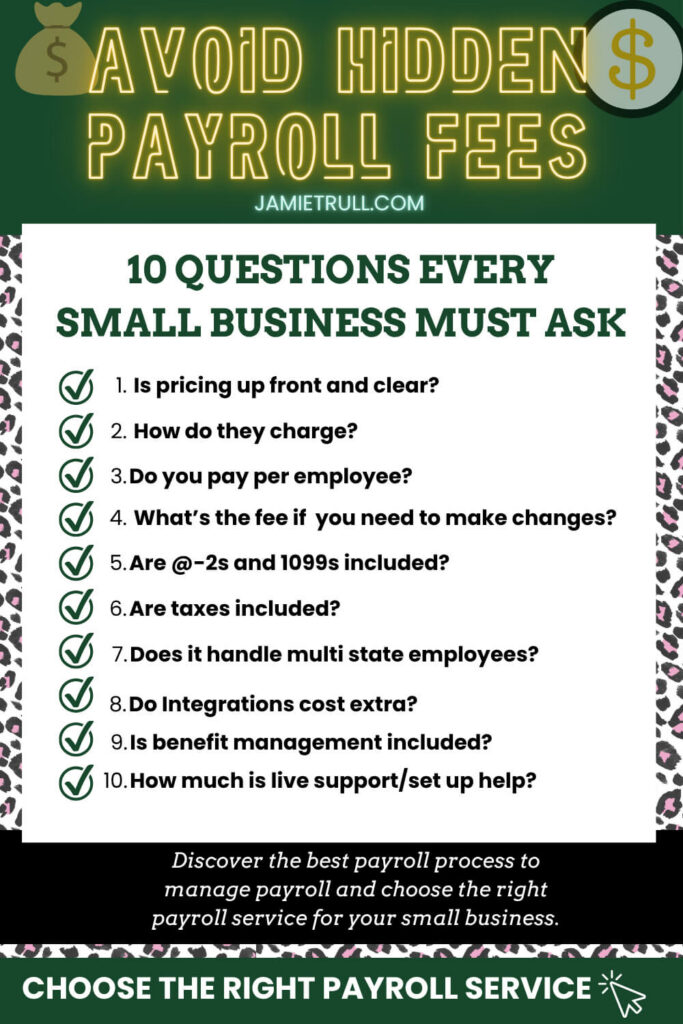
Below are the 10 questions you must ask before you sign anything.
Plus, exactly what to look for on pricing pages, how to compare providers apples-to-apples, and the red flags that tell you to keep shopping.
Table of Contents
- Why payroll providers can be sneaky (and why it matters)
- The 10 questions to ask before you choose a payroll provider
- How to compare payroll pricing (apples-to-apples checklist)
- Special considerations: seasonal teams, remote teams, and multi-state payroll
- My experience switching payroll providers (what I chose and why)
- Payroll provider “deal-breaker” red flags
- Quick decision guide: choosing the best payroll provider for your business
- Next steps + tools
Why payroll providers can be sneaky (and why it matters)
Payroll isn’t just “pay people.”
A payroll system often touches:
- tax filings and payments (federal, state, local)
- employee onboarding and compliance forms
- benefits and deductions (health insurance, retirement)
- reimbursements and recurring stipends
- contractor payments and 1099 workflows
- integrations with your bookkeeping and HR tools
That’s a lot of moving parts, which means it’s also a perfect place for companies to hide fees in the fine print.
The goal of this post is simple: help you ask the right questions now so you don’t pay for surprises later.
The 10 Questions to Ask Before Choosing a Payroll Provider
1) Is the pricing upfront and clear (without a sales call)?
If a payroll provider requires you to “request a quote” for basic pricing, that’s not automatically a deal-breaker.
But it is a friction point.
What to look for:
- clear monthly base fee
- clear per-employee fee
- clear add-ons (state filings, benefits, HR tools, time tracking)
- clear year-end form fees (W-2s/1099s)
Why it matters: unclear pricing makes it harder to compare providers, and increases the odds of surprise charges later.
2) Do they charge monthly… or every time you run payroll?
Some platforms charge a flat monthly fee. Others charge per payroll run.
This means:
- regular payroll runs
- off-cycle runs (bonuses, commissions)
- correction runs
- final paychecks
Why it matters: if you run payroll more than once a month (most businesses do), per-run pricing can add up fast.
3) If you don’t pay an employee for a month, do you still pay their fee?
Many payroll providers charge per employee per month.
But not all of them only bill you for “active” (paid) employees.
If you have:
- seasonal staff
- temporary workers
- contractors you pay intermittently
- employees who only work part of the year
…this question can be the difference between a reasonable payroll bill and one that feels like you’re paying for ghost employees.
Ask: “Do you bill per active employee paid in that month, or per employee in the system?”
4) What happens if you need to cancel or reverse payroll—and what does it cost?
Mistakes happen.
The important part is how expensive the fix is.
Ask:
- Can I cancel payroll before it processes?
- If a payroll is processed incorrectly, can it be reversed?
- Is there a reversal fee? A cancellation fee? A “research” fee?
Why it matters: some providers charge premium fees at the exact moment you’re already stressed.
5) Are year-end forms included—W-2s and 1099s?
January is already chaos.
The last thing you want is a surprise bill for:
- W-2 and W-3 prep and filing
- 1099-NEC prep and filing
- delivery to recipients (employees/contractors)
- corrections and reprints
Ask what’s included and what costs extra.
6) Are state tax filings included in the base price?
Some providers include federal filings but charge extra for:
- state income tax withholding filings
- state unemployment insurance filings
- local payroll taxes (where applicable)
Ask: “Does your base plan include all required state and local tax filings and payments?”
7) Is there a fee for employees in multiple states?
This one matters a lot if you have a remote team (or plan to).
Ask:
- Is multi-state payroll included?
- Do I need a higher-tier plan for multi-state?
- Is it charged per state, per employee, or per month?
Why it matters: multi-state fees are one of the most common “quiet” cost adders for growing teams.
8) Do integrations cost extra?
Integrations save time, until they become add-ons.
Ask about integrations with:
- bookkeeping (QuickBooks Online, Xero, FreshBooks)
- retirement/401(k)
- workers’ comp
- time tracking
- benefits providers
Ask: “Are integrations included, or are they paid add-ons?”
9) Is benefits administration included—or an extra fee?
Even if you’re not offering benefits today, you might want to in the next 12–24 months.
Ask:
- Is benefits admin included?
- Is it only included at higher tiers?
- Is there a per-employee benefits admin fee?
- Are deductions and contributions handled automatically?
Why it matters: benefits are awesome… surprise admin fees are not.
10) Do you pay extra for live support or setup help?
This is the “I’m screaming representative into my phone” question.
Ask:
- Is phone support included?
- Is chat support included?
- Do I need a higher-tier plan for human support?
- Do you provide onboarding/setup specialists?
- Is onboarding included or paid?
Why it matters: payroll is high-stakes. If something is wrong, you want a real human quickly.
How to Compare Payroll Pricing
(Apples-to-Apples Checklist)
When you’re comparing providers, write down these inputs so you’re not tricked by pricing pages:
- Number of employees (average and peak season)
- Number of states you pay in
- Pay frequency (weekly, biweekly, semi-monthly, monthly)
- Typical off-cycle payroll runs per quarter
- Do you pay contractors through payroll?
- Do you need benefits now or later?
- Do you need 401(k) integration?
- Do you need bookkeeping integration?
Then calculate:
- monthly base + (per employee x active employees)
- add-on costs (states, benefits, time tracking)
- year-end form costs (W-2s/1099s)
- likely “oops fees” (reversals, corrections)
This is how you avoid choosing a provider that looks cheap upfront but becomes expensive later.
Special Considerations: Seasonal Teams, Remote Teams, Multi-State Payroll
If your team is seasonal
Prioritize:
- billing only for active paid employees
- flexible plans without tier jump penalties
- easy onboarding/offboarding and rehires
If your team is remote
Prioritize:
- multi-state payroll included
- registration guidance (state accounts, unemployment)
- strong tax filing automation + support
If you’re planning to grow
Prioritize:
- clear upgrade paths
- transparent add-ons
- tools for onboarding, document signing, and employee self-service
My experience switching payroll providers (what I chose and why)
After digging into these questions and comparing providers, I switched to OnPay.
Here’s what stood out to me:
- pricing transparency (no mystery quote process)
- strong support (including setup/onboarding help)
- built for growing teams without constant upsells
- multi-state capability (critical for remote teams)
If you want to explore it (and snag the signup bonus): ? Get started with OnPay
Payroll Provider Red Flags (Deal-Breakers)
If you see these, slow down and ask more questions:
- pricing hidden behind a sales call with vague ranges
- “included” tax filings that only cover federal (not state/local)
- multi-state payroll only on top-tier plans
- paid support tiers (basic plan = no humans)
- unclear year-end pricing for W-2s/1099s
- expensive correction/reversal fees
Quick Decision Guide: Which payroll provider is best for you?
- Solo + first hire soon: Choose something transparent, simple, and support-heavy.
- Remote team (multi-state): Make multi-state pricing and state filings a top priority.
- Seasonal workforce: Look for “active employee” billing and flexible payroll runs.
- Growing team + benefits: Ask upfront about benefits admin, deductions, and integration costs.
Next Steps
- Copy the 10 questions above into your notes app.
- Compare 2–3 providers using the apples-to-apples checklist.
- Choose the one that fits your team today and won’t punish you for scaling.
Sponsor Disclaimer: This post may include affiliate or partner links. If you use them, I may earn a commission or referral bonus at no additional cost to you. I only share tools I’ve tested or genuinely believe can help small business owners stay informed, organized, and profitable. This content is for educational purposes and is not a substitute for advice from your accountant, tax advisor, or attorney.
This transcript was generated from the video for your convenience, but it may contain typos or slight errors due to the transcription process. For the most accurate and complete information, we recommend watching the full YouTube video.
Small Business Payroll Provider: Choosing the Right Payroll Solution for Your Business
Are you about to switch payroll providers or choose your very first one before you sign on the dotted line Union?
Ask these 10 questions, or you risk getting hit with unexpected fees that could quietly drain your bank account.
Hi everyone. I'm Jamie Trull, CPA and Financial Educator, and here in this channel I love to bring you everything you need to stay informed, organized, and profitable in your business finances.
So please, please, please make sure to like and subscribe.
So today I am gonna pull back the curtain on payroll companies and specifically some of those sneaky costs that some payroll companies won't tell you about until it's too late.
Let's make sure you know exactly what you're paying for and what you shouldn't be.
Now, make sure to stay until the end, because I'm gonna tell you about my experience switching payroll providers and why I made the switch, and which provider I decided to switch to.
But first, let's look at those 10 questions to ask, or things to find out about on their website before you sign up for a new payroll provider.
Number one is the pricing upfront and clear.
Now, most small business owners that I know do not have time to fool around with price quotes or getting on a sales call. That is just something that most people aren't going to want to do.
Plus, I just prefer working with people who are upfront about what the cost is gonna be so that I have the information I need to make a decision for my business.
And not only do you want them to be transparent about what the say monthly cost is for payroll, but also what is additional. So some payroll companies hide these and don't tell you about them until later.
So make sure to be looking this up, up front. Which leads me to question number two to ask, and that is, do they charge a monthly fee?
Or do they charge every time you run payroll?
Payroll Process & Payroll Software Costs: Understanding Business Payroll Fees
And yes, some providers truly do charge you every single time you run payroll.
That includes regular runs as well as any additional off-cycle payrolls you would need to run, including maybe bonus checks or corrections that you need to run.
And most companies run payroll more than once a month, so that can really add up fast.
So when you're comparing costs between payroll providers, just make sure you're comparing apples to apples.
And make sure you understand how that payroll system is charging and that it actually aligns with how you plan to use it.
Question number three to ask your payroll provider is if you skip paying employees for a particular month, do you still have to pay the fee for them?
The pricing for most payroll providers I've seen includes a monthly fee and then an add-on per employee.
And that's usually a small charge for each employee that you have, but it's important to clarify.
Especially if you have a seasonal workforce, whether your bill per active employee or not, meaning the employees that you're paying in that given month.
The difference between paying for all of your employees in a system or just the active ones that you're paying that month can really make a big difference.
Especially if your workforce is one that fluctuates throughout the year.
Now, question number four, what happens if you need to cancel or reverse a payroll?
Now, mistakes happen, but some providers are gonna charge you the big bucks in order to fix those mistakes.
So make sure you're asking about cancellations and reversal fees upfront.
Again, this is one of those things that we often don't think of until we need it, so it's better to be aware from the get-go.
Payroll Taxes, Employee Accounts & Payroll Insights for Small Business
Question number five.
Are year-end forms, like 10 99s or W twos included in the price.
It's really common for providers to charge extra for these types of year-end forms and those surprise charges come January are not fun.
So just be clear on what the regular fee you are paying covers and what it doesn't.
Question number six: are state tax filings included in the price?
State income tax and unemployment tax aren't always included in every payroll provider's base plan, which means you might have to actually upgrade your plan to get that or pay extra for that to be included.
Again, that's something you wanna know upfront.
Now, a related question to ask your payroll provider is question number seven: Is there a fee to pay my employees in multiple states?
So this one was really big for me, specifically because I have a fully remote team, and that means that my team is spread out in multiple different states.
And when I was shopping around for payroll providers, I realized that it was actually pretty common for them to charge you extra to pay employees in multiple states.
Or require you to be on a higher plan that included that.
So if you have a remote team like I do, or you plan to, this is a must ask.
Question number eight is all about integrations: Do integrations with your bookkeeping software or your 401k or even with workers' comp cost extra.
Some platforms do charge for syncing with key tools, while others will include this in their base plan.
Payroll Provider Comparison: Health Insurance, Workers Comp & Benefits Administration
So just make sure that what you need is covered.
Question number nine, especially if you're looking to eventually be able to offer benefits, is whether benefits administration is included in the plan.
Or whether that costs extra Offering benefits is amazing, but you don't want it to come with surprise fees later on, so make sure you know exactly.
What is covered.
And question number 10 is a huge one as well that you do not wanna miss.
And that question is, do you need to pay extra for live support or setup help? Now, some providers are going to restrict access to actual humans unless you are paying for a higher tier plan.
And for me, that is a big red flag, if you ever run into any issues.
I don't know about you, but if you have ever wanted to throw your phone out the window after screaming representative into it a thousand times, then you know how important this is.
All that is to say, I have found that not all payroll platforms are created equally.
Transparency matters, and the more you ask upfront and are clear about the less surprises you will have later.
Now, after doing all of this digging.
I ended up switching my payroll provider last year to one that fit my needs and one that wasn't gonna have a whole bunch of surprises pop up later.
QuickBooks Payroll Alternatives & Paychex Flex: Choosing the Best Payroll Solution
Last year I switched to on pay and I've been really happy with it.
They're upfront with their pricing.
They're transparent about their fees.
And they're designed for growing businesses that don't want any billing surprises.
Plus I have a real live contact person to reach out to, and she helped me with the entire transition, which meant I didn't need to waste my precious time sitting on hold on a one 800 number for eternity.
Now if you wanna check out how I set up my very first payroll in on pay and the exact process I use, make sure to watch this video next where I walk you through my entire switch.
And if you're interested in checking out on pay and getting a hundred dollars bonus just for signing up, use my link at jamietrull.com/onpay.
Or you can also use the QR code that's currently on your screen.
If you found this helpful, don't forget to like and subscribe and also make sure to comment down below any questions that you have about payroll or on pay specifically.
I'll see you next time.