
If managing your bills feels like a never-ending game of email tag and calendar alarms, you’re not alone. As your business grows, “just paying a few invoices” can quietly morph into a part-time job.
Tracking due dates, forwarding PDFs, logging into bank portals, writing checks (ugh), and wondering if you already paid that vendor or not.
Good news: Accounts Payable (AP) automation has matured a ton in the last few years, and two tools stand out for small businesses in 2026:
BILL (formerly bill.com) and Melio. I kicked the tires on both, looked under the hood, and brought back practical takeaways so you can choose the one that fits your stage, team, and workflow.
Quick links for my accounts payable automation recommendations (with my current deals and bonuses):
Why AP Automation Matters (Even if You’re “Small”)
Think of a modern AP tool as your bill-pay assistant. It centralizes all invoice data without manual data entry.
It remembers due dates, routes approvals to the right people, and initiates payments on time (via ACH, check, or even credit card). Plus, it syncs it all to your accounting system—so your books stay clean without double entry.
What that means for you:
- Fewer late fees and awkward “did you get my payment?” emails
- Clear visibility into what’s due, when, and for how much
- Near-zero manual data entry (hello, OCR and email-to-bills inboxes)
- Stronger internal controls and fraud prevention
- Cleaner month-end close and easier audits
- Options to pay by credit card for cash-flow float—even when the vendor only takes checks/ACH
If your current “system” is Outlook + spreadsheets + bank logins, you’re doing far more work (and taking far more risk) than you need to.
AP Process: How The Automation Flow Works, in Plain English:
- Collect the invoice
- Vendors email your dedicated bills inbox (e.g., bills@yourcompany.com) or you drag-and-drop PDFs.
- The tool reads the invoice (vendor, due date, amount) using OCR.
- Code the bill
- Pick the expense category (or use saved defaults), add class/project, attach PO if needed.
- Route for approval (optional but recommended)
- Simple: manager sign-off.
- Advanced: dollar thresholds, department approvers, multi-step workflows.
- Schedule the payment
- Choose ACH, check, or credit card; pick a date; set recurring when appropriate.
- Sync with your accounting software
- Push bills, payments, and attachments to QuickBooks, Xero, NetSuite, etc.
- Reconcile with a smile
- Because the system did the heavy lifting, month-end is mostly review. NOT data entry.
Accounts Payable Software Tool #1: BILL (formerly bill.com)
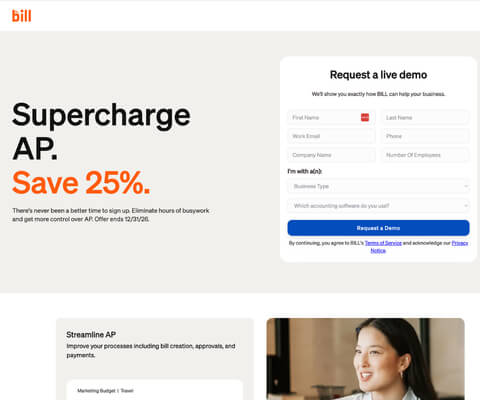
AP Software Best for:
Small to mid-sized businesses that need structure, control, and collaboration across a finance team.
Especially if you’re handling larger volume, multiple entities, or you want serious audit readiness.
What Stood Out About Bill
- Advanced approval workflows
Create multi-step, conditional approvals (e.g., Marketing under $2,500 → Manager; over $2,500 → Manager + CFO). Perfect for separating duties and tightening controls as you scale. - Granular user roles
Give bookkeepers read-only access, AP clerks the ability to enter bills but not release payments, managers approval-only access, and keep payment authority with owners/CFOs. - Full audit trail
Every edit, approval, and payment event is captured, time-stamped, and reportable. If you’ve ever been through a lender review or a state audit, you’ll appreciate this. - Integrated cash-flow view
See upcoming outflows by week/month and scenario-plan payment timing. - Enterprise-grade security & fraud prevention
Positive pay files, vendor verification, and payment-level safeguards reduce risk compared to mailing checks or using raw bank transfers. - Deep integrations
Works beautifully with QuickBooks Online, Xero, NetSuite, Sage Intacct, and more. Attachments flow through so your accountant has the source docs at month-end.
Ideal Use Cases For Bill
- You have multiple approvers and want rules instead of ad-hoc emails.
- You process a lot of bills and can’t afford duplicates, missed due dates, or “who approved this?” confusion.
- You’re aiming for strong internal controls (or your banker/CPA is nudging you).
Bill’s AP Software Pros For Your Business
- Industrial-strength workflows and audit trails
- Excellent for teams and multi-entity setups
- Tight accounting integrations
Bill’s AP Process Considerations
- More features = more to configure (worth it for teams)
- Best fit when you truly use approvals and controls (otherwise you’re paying for horsepower you’re not driving)

Accounts Payable Software Tool #2: Melio
Best for: Modern, agile small businesses who want to pay bills fast (including by credit card), stay organized on the go, and scale into more features over time … without getting bogged down.
Get my current Melio bonus: https://jamietrull.com/Melio
What Stood Out About Melio‘s AP Automation Software
- Pay by credit card—even if the vendor doesn’t accept cards
Melio pays your vendor by ACH or check and charges your card (typical 2.9% fee). If you manage cash carefully and pay in full each month, that ~30-day float can be a lifesaver. The points don’t hurt either. - Free starter option
A generous entry tier lets you get rolling with ACH; paid tiers add accounting sync, user permissions, and batch payments (huge timesaver). - Mobile-friendly and intuitive
Clean UI, smooth on desktop and mobile. Easy enough for owners who don’t want to babysit a complex dashboard. - International payments
Competitive FX and straightforward flows for paying overseas vendors or contractors. - Batch pay
Queue up multiple bills and pay them all at once. One approval, one release, done.
Ideal Use Cases For Melio: Accounts Payable Software Solutions For Small Teams
- You’re the owner/ops lead doing AP yourself and want it simple and fast
- You need card flexibility for cash-flow or points
- You want to start free, then add features as needed (sync, users, batch)
Pros Of Melio Accounts Payable Automation Software
- Lightning-fast to adopt
- Card payments for any vendor
- Great mobile experience and international options
Considerations of Implementing Melio
- AP workflow approvals and user controls are simpler vs. BILL (though paid plans add more)
- Card fees apply when you choose to use a card; ACH remains cost-effective
BILL vs Melio: At-a-Glance
| Feature | BILL | Melio |
| Best for | Teams needing controls & audits | Owners/lean teams wanting speed & flexibility |
| Approvals | Advanced, multi-step, conditional | Simple; more on paid tiers |
| User roles | Granular by role & task | Basic on free; expands on paid |
| Payments | ACH, check, some card options | ACH, check, pay-by-card for any vendor |
| Batch payments | Yes | Yes (paid tiers) |
| International | Yes | Yes (strong UX) |
| Integrations | QBO, Xero, NetSuite, Intacct, more | QBO, Xero (check current list) |
| Audit trail | Robust | Solid; simpler than BILL |
| Learning curve | Moderate (more power) | Low (fast start) |
| Best link | jamietrull.com/BILL | jamietrull.com/Melio |
Picking the Right Tool: A Quick Decision Guide
- Choose BILL if you:
- Need approval routing through managers or departments
- Need segregation of duties and audit-grade logs
- Process invoices at high volume or run multiple entities
- Want policy-driven approvals and precise permissions
- Choose Melio if you:
- You’re the primary bill payer and want a clean, fast workflow
- Want to pay by credit card even when vendors don’t accept cards
- Prefer to start free and add features as you grow
- Make occasional international payments and like a mobile-friendly tool
Truth: both are great. It’s less “which is better?” and more “which fits how you actually work?”
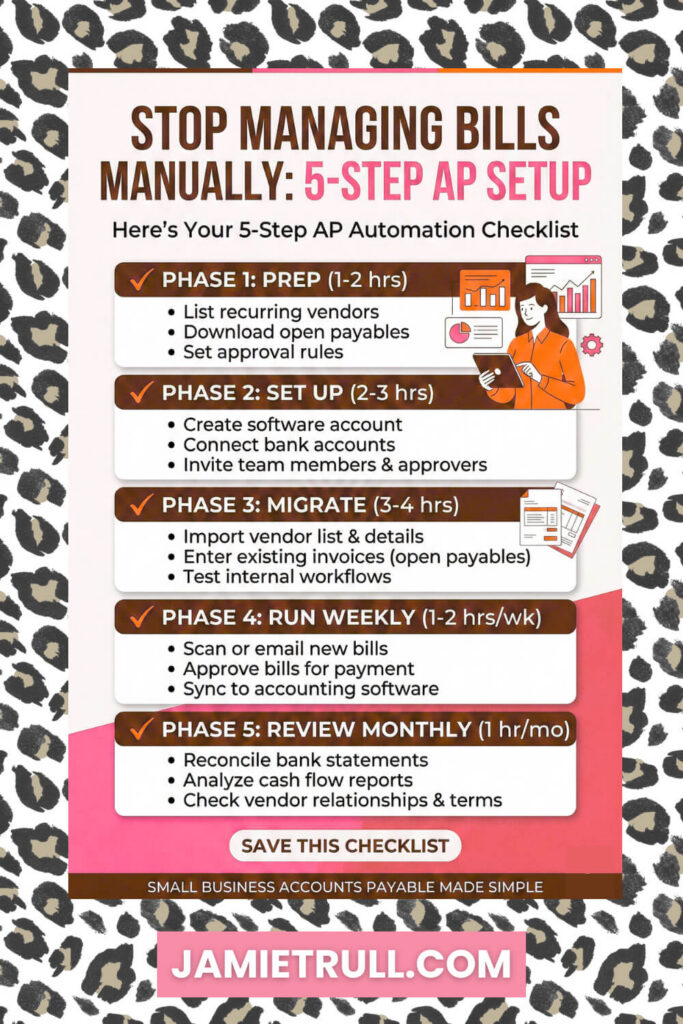
Implementation Checklist (Do This Once, Reap the Benefits Monthly)
👇 Phase 1 — Prep (1–2 hours)
- Make a list of current recurring vendors (rent, software, contractors, utilities).
- Download a month of recent invoices and your open payables list.
- Decide who should approve what (by dollar thresholds or departments).
👇Phase 2 — Set Up (1–2 hours)
- Create your account (BILL: jamietrull.com/BILL | Melio: jamietrull.com/Melio)
- Connect bank accounts (and a card if using card-to-vendor).
- Turn on accounting sync (QBO/Xero/etc.).
- Add team members and assign roles/approval rules.
👇 Phase 3 — Migrate (1–3 hours)
- Forward bills to your bills inbox or upload PDFs (OCR will read them).
- Code the first batch and save vendor defaults (category, class, terms).
- Set up recurring bills where applicable (rent, subscriptions).
👇Phase 4 — Run (30–60 minutes per week)
- Approve queued invoices once per week.
- Batch pay everything due within 7–10 days.
- Let the tool send remittances and sync entries to your books.
👇 Phase 5 — Review (Monthly)
- Check AP aging, upcoming cash needs, and vendor spend trends.
- Download the audit log (BILL) or payment history (Melio) if needed.
Smart AP Policies That Save Real Money
- “No PO, no pay” for large/recurring vendors
Even a simple PO or scope note curbs surprises and scope creep. - Approval thresholds
- Under $500 → AP clerk or owner
- $500–$2,500 → Manager + owner
- Over $2,500 → Manager + CFO/owner
- Vendor verification step
Before first payment or bank change, verify banking via a known contact method. - Batch day
Pay bills in one weekly batch. Cuts time and makes cash flow predictable. - Use card strategically
If you opt to pay by card (Melio), do it for timing benefits/points—only if you pay in full monthly.
Common AP Automation Software Pitfalls (And How to Avoid Them)
- Duplicate payments
Use a single AP inbox, let OCR auto-flag duplicates, and avoid paying from email threads. - Over-approval or no approval
Keep it lean: one manager + one finance owner is plenty for mid-ticket bills. - Unsecured check stock
Offload check-printing to the platform or lock down check stock. Never leave blank checks in drawers. - Late fees
Route invoices the day they arrive; schedule payment for 3–5 days before due date. - Messy books
Turn on sync and attach the invoice PDF to the bill. Your future self (and your CPA) will applaud.
Real-World Scenarios For Small Business Accounts Payable Software
- The agency with remote approvers
Use BILL’s conditional rules so each department head approves their spend; finance releases batches weekly. - The solo owner juggling cash flow
Use Melio to pay by card for 20–30 days of float on big vendor bills and ACH everything else. - The ecommerce brand paying overseas
Use Melio’s international flows for straightforward FX and consolidated payment history. - The contractor with many small vendors
Both tools eliminate paper checks and let you batch pay 10–30 bills in minutes.
Accounts Payable Software FAQs
Can I keep my accountant happy with either tool?
Yes. Both sync with QuickBooks/Xero and carry attachments for clean audit trails.
What if my vendor only takes checks?
Both can mail checks on your behalf. Melio lets you pay by card while your vendor still receives a check/ACH.
Do I need to switch on January 1?
No. You can start now. Import open bills and begin paying through your AP tool this week.
Is it secure?
Yes, far more than emailing PDFs and mailing checks. You’ll also reduce exposure to check fraud.
My Take: Which Accounts Payable Software Should You Choose?
- If you want policy-driven approvals, audit-ready trails, and team collaboration, go with BILL.
👉 https://jamietrull.com/BILL - If you want speed, simplicity, and card-to-vendor flexibility, start with Melio.
👉 https://jamietrull.com/Melio
And honestly? Some businesses start on Melio for speed, then layer into BILL as headcount and approval complexity grow. There’s no wrong order—only the next best step for where you are today.
Ready to Stop Chasing Invoices?
It’s time to invest in AP automation software.
Pick your tool, set aside two hours, and run your first batch this week.
Your future self: calm, organized, and late-fee-free you, will thank you.
- BILL (AP for structured teams): https://jamietrull.com/BILL
- Melio (fast, flexible bill pay): https://jamietrull.com/Melio
Sponsor & Affiliate Disclosure
This article is for educational purposes only and does not constitute tax, legal, or financial advice for your specific situation. Please consult your own advisor. Some links above are affiliate/partner links, which may result in compensation to me at no additional cost to you. I only recommend tools I genuinely use or believe in. This post includes sponsored promotion of BILL and Melio.
Transcript: This transcript was generated from the video for your convenience, but it may contain typos or slight errors due to the transcription process. For the most accurate and complete information, we recommend watching the full YouTube video.
Small Business Accounts Payable Software & Accounts Payable Process Overview
Paying Bills Just Got Easier Top 2 AP Tools for Small Business Owners Cut 2
If managing your business bills feels like a never ending game of email tag and calendar alarms, it might be time for an upgrade. I’m Jamie Trell, CPA, and Financial Educator for small business Owners.
And today we’re talking about how to streamline your accounts payable process, also known as paying your bills.
The smart way.
If you know me, you know on this channel I love to talk about different tools and solutions to help small business owners manage their business finances in a more effective and efficient way.
So if you’re into that kind of thing, please make sure to like and subscribe.
So this is an area that I really jumped into researching because of my own experience with managing bills in my business.
That’s one thing that has become a source of pain as I’ve grown my business and scaled, it’s still often me who is processing payments for bills and trying to keep track of everything that’s due.
And to be honest, I just do not have time for that any more.
And if you’re feeling the same way, then this video is perfect for you.
Accounts Payable Automation & Financial Operations Solutions
Now, in preparation for this video, I went out to see what the marketplace had in terms of various different ways to help you manage your accounts payable much more efficiently. And I came back with my two favorite solutions to be able to recommend to you. So today we’re gonna break down those two trusted AP solutions Bill. And Emilio, and show you how they can simplify and automate your account’s payable process. Now we’re gonna get into discussing the specific tools and who they’re best for here in a little bit. But first, let’s talk about what AP automation actually is. I had heard of tools like this, but didn’t really have a great grasp on exactly what these tools really did in practice when you get rid of all the buzzwords.
Invoice Processing & Cash Flow Management in the Accounts Payable Process
So let’s talk about what’s happening. Now in your business, for many business owners, invoices land in your inbox and maybe get buried. I dunno about you, but typically most invoices I actually get electronically. Now they’re not typically coming through the mail, and if you don’t pay it immediately, it’s really easy for it to get lost. And I say this as someone speaking, unfortunately from. Experience. Now, sometimes I wait to pay my bills intentionally because of cashflow reasons, and I might not always wanna pay them right away because they’re not due yet. And so it would be better from a cashflow perspective to wait, but I’m always afraid that I’m gonna completely forget about them.
Payable Automation, Approval Workflows & Vendor Payments
But what if you could take a very quick and easy action when you first got that bill and then wouldn’t have to worry about forgetting to pay it later? That’s just one of the things that an AP automation platform can help you with. No more being embarrassed or scrambling. When you’re told that an invoice is overdue, everything is taken care of, or maybe you’re forwarding those invoices to a bookkeeper or a team member for them to process or waiting on client approvals, or worse yet. Handwriting checks every week. Not only is this time consuming, but it can leave the door open for things like duplicate payments accidentally, and it also leaves additional room for missed deadlines and even fraud.
Accounts Payable Solution Features: AP Workflow & Cash Flow Tracking
So I want you to think of AP platforms as your bill paying assistant. So they’re gonna help you do things like automate bill payments, digitally, track due dates, organize invoices and vendor information, avoid late fees, sync with your accounting system. Eliminate manual entry. They can allow you to pay by a CH check or even credit card, and they very much reduce the risk of fraud through secure processing.
Now, going back to the tools we’re talking about in this video, both Bill and Elio provide these capabilities. Now, what differs between these two tools is how they’re designed to fit different businesses at different stages.
Bill.com: Advanced Approval Workflows & Financial Control
So let’s jump into our first tool, which is. Bill, formerly known as bill.com. If your business has more moving parts like a team handling finances, multi-layered approval processes or regulatory needs, bill offers an all in one solution that grows with you. Here are a couple of the key features that I found when I was exploring in Bill. They have advanced approval workflows and user roles, which again, is really helpful if you have a team and multiple people have different roles in the approval process. They also have a full audit trail and compliance documentation support, which is really great if you need to make sure that you can stand up under audit.
Cash Flow Management, Audit Readiness & Integrations
It also includes features like real-time cash flow tracking, and those of you who watch this channel know how important cash flow tracking is to me. So I think that’s a fabulous feature and security and fraud prevention built into every single payment. So I’m really big, anytime we’re using any of these types of platforms, we need to make sure that payments are secure. And of course, you’re gonna have seamless integration with various different platforms like QuickBooks Online. NetSuite zero, pretty much anything that you’re using for bookkeeping and accounting. So who is Bill best for? Well, I would say it’s really good for small to medium-sized businesses that need financial control, audit readiness, and collaboration across. Departments. So if that sounds like you, you can actually sign up for Bill and get 25% off, whichever plan you choose at jamietrull.com slash bill.
AP Automation Software Cost & Flexible Vendor Payments
Let’s move on to tool number two that we’re gonna talk about here today, and that is. Lio Now, LIO is an AP platform that is designed to meet small business owners where they are making payments easy, fast, and flexible with the power to scale up as your business grows. Now, LIO also has some great key features that I wanted to make sure that I mentioned here. Now, one thing that I love just from a practical standpoint is the ability to pay vendors. With a credit card, even if they only accept checks or bank transfers, there is a small credit card fee that we’re used to seeing of about 2.9% to do that. But remember that paying with a credit card, if that’s something that you do in your business and you pay off every month, can be a great way to get extra cash flow float, because typically.
Cash Flow Float, Batch Payments & Accounts Payable Automation
When you pay via credit card, you don’t actually have to pay that credit card off for an entire month. So depending on your business and your cash flow situation, that could definitely be worth that 2.9%. Another feature that I love about Emilio and I think makes this really accessible to small business owners. Is the fact that they actually have a free, essentially starter plan available that allows you up to five a CH transfers per month. Or you can go for one of their higher plans, like let’s say their unlimited plan, which is still competitively priced for small businesses.
International Vendor Payments, Accounting Sync & AP Workflow
I also really love how mobile friendly lio is, which allows you to really easily make payments on the go so you don’t forget. Also, if you tend to have a lot of international payments, LIO is great for that and they have really competitive rates for international payments. And if you opt for one of the paid plans, which is the core boost or unlimited plan, you’re also gonna get accounting sync, user controls and batch payments. And I gotta tell you, batch payments are amazing in general, and they allow you to make a whole bunch of payments. All at once without having to go in and do each one of them separately. So great, great time saver.
Choosing the Right Accounts Payable Solution for Financial Operations
So of course I jumped into Emilio to try it out and I really liked the user interface, the feel of it. I felt like it was really intuitive and easy to figure out, and I definitely can see the appeal for lots of different small business owners. So who is LIO best for? I would say it’s great for growing and scaling small businesses that want an easy and affordable way to get started. Like I said, they even offer an introductory free plan, which allows you to kind of try it out and see if it’s a good fit for you before you upgrade to one of the paid plans. And of course, I’ve negotiated some special bonuses just for you. So if you sign up with my Emilio link@jamietroll.com slash mio, you’re gonna get an extra a hundred dollars bonus.
Final Thoughts on Accounts Payable Automation & Small Business Cash Flow Management
So overall, what are my takeaways from playing around in these systems? Honestly, after spending some time in both of them, I’m pretty impressed with their capabilities and what they can do. So if you’re wondering which of them I recommend, honestly you can’t go wrong. But if you’re gonna force me to give you some more differentiation, I would say that Bills specifically is best for businesses that are ready to scale with structure because it offers really powerful tools for things like automation. Audit and internal controls, which as an ex big four auditor back in the day, I very much appreciate. I’d say for Emilio, it’s really great for modern agile businesses who want financial flexibility and love the ability to pay bills their own way.
But here’s the thing. Whichever one you choose, you’re on your way to a smoother, more professional way to manage your business. In my experiences, small business owners often hold out for way too long before they implement amazing time saving tools just like this. And of course, you can use my links in the comments below to explore both of these different solutions. Now, tell me in the comments, have you used either of these? Which are you excited to try? Comment down below, and again, make sure to like and subscribe for any future updates. Thanks for being here, and hopefully this makes your life just a little bit simpler and easier. See you next time.